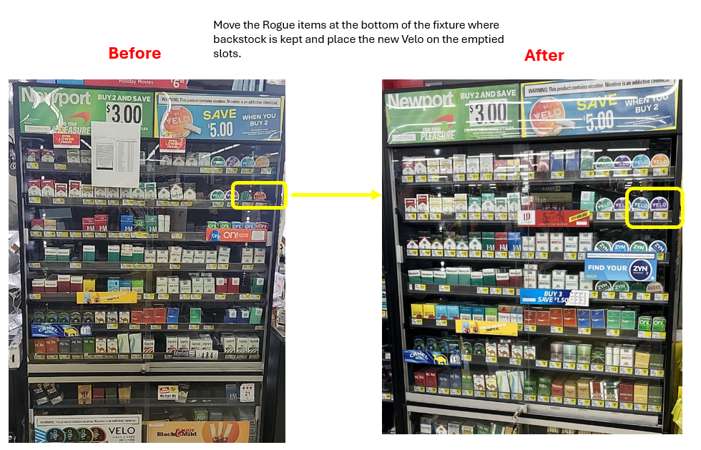
The Velo product must be placed in its assigned spot on the fixture. If another brand or project is currently sitting in that space, you will need to:
- Move the other product to the backstock area, which is located at the bottom of the fixture.
- Make room for the client’s Velo product exactly where the Planogram (POG) indicates.
Follow the POG Exactly
- Open the POG link provided in every survey, Every Time
- Each store may have a different POG, so never assume it’s the same as the last store.
- Place items exactly as shown in the POG, same order, same rows, same positions.
Best Practice to getting it right the first time
After setting the display:
- Take your straigh on and clear “after” photo.
- Compare your photo side‑by‑side with the POG to Confirm that every item matches perfectly.
If it does not match the POG, the visit will be sent back for correction. Only select that it is per planogram it if matches 100%
If You Cannot Move Something
If anything prevents you from moving products, placing Velo, or completing the setup:
- Document the issue thoroughly.
- Include the manager or employee’s name who informed you of the restriction.
- Provide clear supporting photos showing the issue.
EXAMPLE PHOTO
Comments
0 comments
Please sign in to leave a comment.