Your main objective is locating Mission displays in-store. If the manager says the display isn’t here or they don't want to help you find it, here’s what you need to do so we can approve your visit and make sure you get paid:
Each visit should last at least 30 minutes to allow enough time for a complete search (Home Depot is BIG).
Products can be found in different spots depending on the location who reset the store: Start where these items usually are:
- Safety/Workwear aisle
- Seasonal (Front of Store)
- Outdoor Garden
- Tool department endcaps
- Promo/Action Alley display
We need to see you looked everywhere. If the cooling display isn’t there, take wide aisle shots + photos of all areas you checked. Empty peg? Random endcap? Packed‑out shelves? Take the photo.
Tell us: What the manager said, Where you searched, Anything unusual (resets, out of stock, moved displays, etc.)
Your goal: Show us the full story through photos and notes.
If we can see where you looked, we can approve the visit, even when the display isn’t in the store.
Displays found?
Merchandise every display you find so it is clean, organized, and properly stocked. Merchandising is part of the standard visit expectations.
What should a Merchandised display look like? 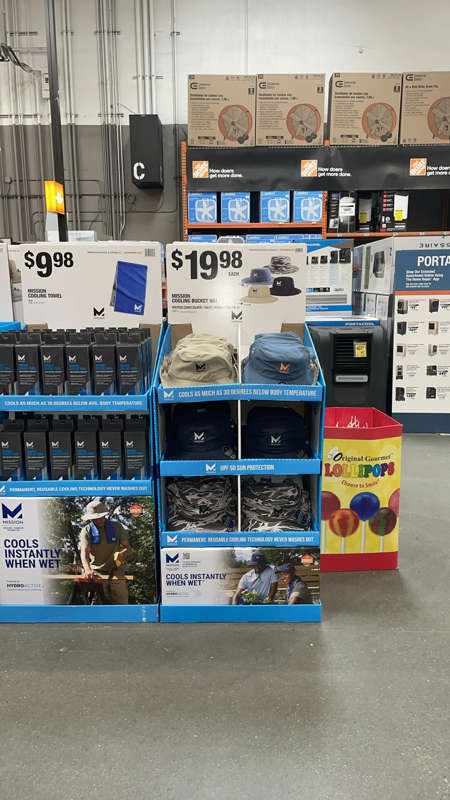
If this helped you, give it a Thumbs up, so we can continue to improve surveys internally
Still Need Help? Go to Chat with Steve in the main menu of your app → Type “in-store support” → Follow prompts to get live help.
Comments
0 comments
Please sign in to leave a comment.